
There is a lot of misconception about performance that I see floating around the interwebs, so I wanted to just give a general primer on the topic and hopefully clear a few things up. Performance is largely determined by 2 components; Your CPU and your GPU. If you enable the FPS output in X-Plane, you can see detailed information about how performance is coming together.
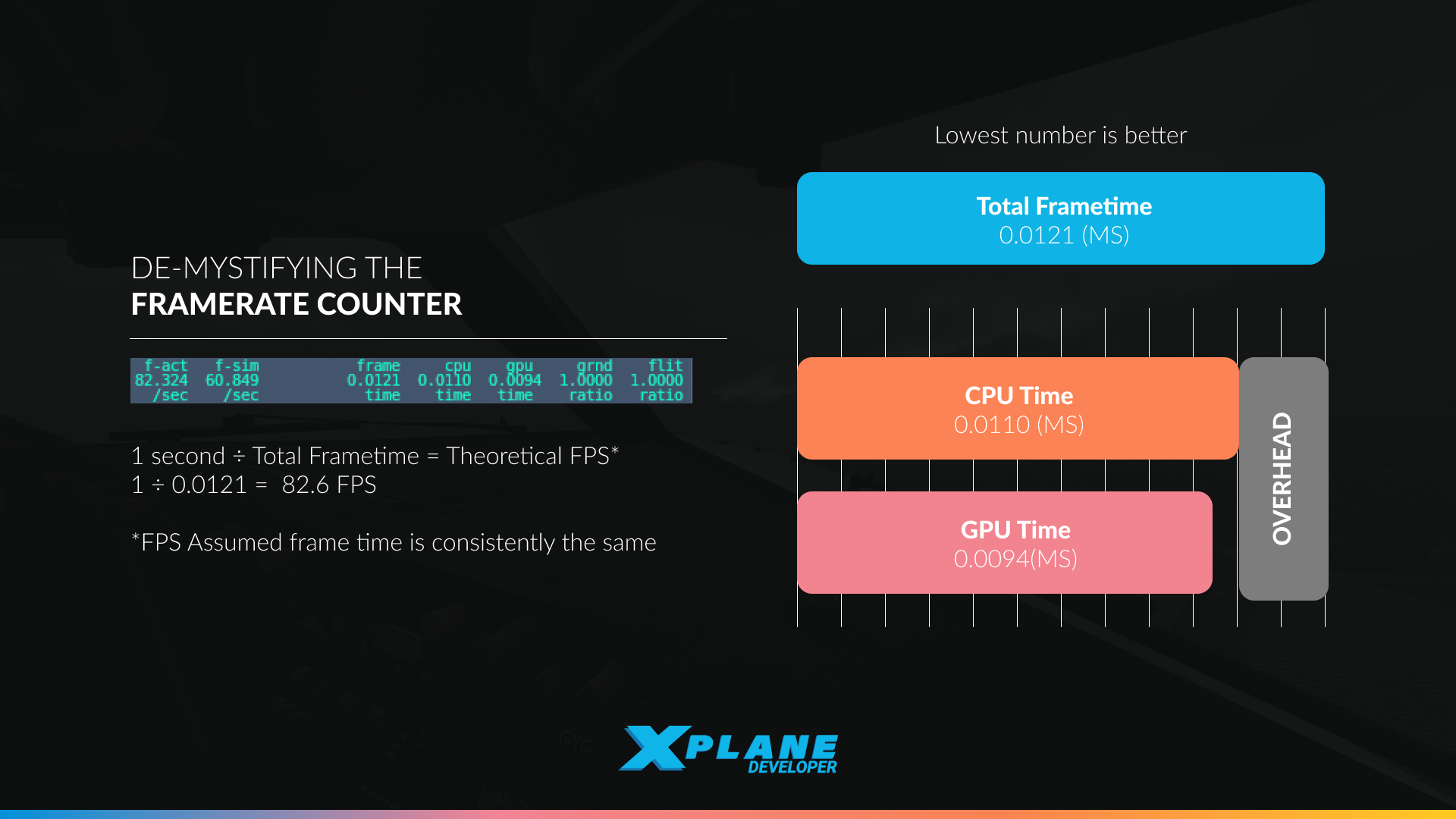
^ This is a simplified graphic
There are multiple columns here, f-act is the number of frames presented per second. Then there are also frame, cpu and gpu, which are measured in seconds per frame. In this case the CPU column reads 0.0110 which is equal to 11ms (milliseconds), while the GPU column reads 0.0094 or 9.4ms. In this case, the CPU takes longer to produce a single frame and is the bottleneck, although not by very much. The frame column is the actual time taken per frame and includes additional overhead from the driver and operating system and in this case it’s 0.0121 or 12.1ms, an additional 1.1ms of overhead over the CPU time.
You can use these numbers to figure out what settings to reduce to increase FPS. Whichever number is higher, CPU or GPU, is the limiting factor for performance. If you are CPU bound, you can spend any number of dollars on a new GPU and not make a dent in performance. The same is true the other way around as well.
This is true for every game and simulator by the way, not just X-Plane. Too often I see someone online say something like “I bought $(very expensive graphics card) but my performance is still the same”. Before you go out and spend a lot of money, make sure you are spending money on the right part!
FPS is a bad measure
Performance is usually measured in frames per second (FPS), but it’s actually not that good of a measure. As developers we prefer to think of performance in terms of time taken per frame, which is the inverse of FPS. You can convert between the two by doing FPS = 1 / frame_time or frame_time = 1 / FPS. At 60 FPS you get 1 / 60 = 0.0166666667, the time being in seconds, gives 16.6ms (milliseconds).
The reason we prefer to talk in terms of time per frame is that FPS doesn’t work as a relative measure. “5 FPS more” or “10 FPS less” doesn’t actually mean anything without some baseline to anchor it to. Let’s pick 3 data points, 30, 60 and 90 FPS and a relative measure of 5 FPS less. Here are the results for this:
(1 / 25) - (1 / 30) = 0.0066666667
(1 / 55) - (1 / 60) = 0.0015151515
(1 / 85) - (1 / 90) = 0.0006535948
If your baseline was 30 FPS, losing 5 FPS is a whopping 6.6ms of additional time taken per frame. At 60 FPS it’s 1.5ms and at 90 FPS it’s 0.6ms. That’s a huge difference! 6.6ms is a lot of additional time per frame and is a real problem, while 0.6ms isn’t all that much. This is why we prefer to talk about time per frame, 1ms is always 1ms.
Hopefully this also demonstrates that this is a “The rich get richer” type of thing. If you start out with very high CPU times, you will have shave off a much larger amount of CPU time in order to get more FPS, while those starting with quite low CPU times already need to move the needle just a little bit to get more. Every doubling of FPS requires a halving of the frame time, and half of 16 is a lot less than half of 33.
For a full breakdown of 12.4.0 and current multi-threading expectations, please see this blogpost: The glorious multi core future is now the boring present

This was a very enlightening post; now I better understand the numbers being displayed.
Nice write-up for people who did not already know this part. Still leaves me curious why in some cases frame time is not a couple of ms higher but 8-10 times as high as cpu/gpu like in some screenshots seen online.
NB: I edited your comment to remove the Discord link since they aren’t great for permanence, sorry!
In general, frame time measures all of the overhead from the system. Probably the biggest contributor might be V-Sync, since the extra time spent waiting shows up under frame time. Apart from that, you also have driver and general system overhead. The column doesn’t differentiate the cause, it’s just there to point out that it is outside of X-Plane.
yeah, I knew the v-sync, (or other frame capping?) But we did not find any of that here or in the two other ones