
This is a blog post that I have dreamed of writing for years, in fact ever since I got hired 8 years ago: The glorious multi-core future is now. But, as always, there are strings attached so let me explain what’s in this release and what to expect. First though, if you need a primer on performance in general, you can read all about it here: A very quick performance primer
Terms of service
1. Expectations
Let me get this out of the way first: Don’t bother asking what you can expect in terms of performance gains. You could see anything from none, moderate to a lot. Multi-threading inherently only affects the CPU, so if you are GPU-bound, you won’t see any improvements in terms of FPS because the limiting factor is still the GPU. Everything else depends on how you have configured X-Plane, your hardware, what add-ons you are running with etc. The only way to know what, if any, improvements you will see is by installing 12.4 and trying it out yourself.
2. Future Plans
Also, this isn’t the last multi-threading update. I’m very excited about it, but it’s a small fraction of what we have planned. There is more engine refactoring work to be done, more code to be optimized, but we figured “Why sit on improvements that we have right now when we could get them out to customers to properly battle test them?”
Where we came from
One myth is that X-Plane was not multi-threaded at all, which depending on your point of view is either patently false or somewhat true. X-Plane does a lot of work on background threads, especially scenery loading and texture paging. But those are all long running background tasks, what we lacked so far was true per-frame multi-threading. We had a few small tasks that could run in parallel, but the bulk of the frame was generated on the main thread.
It’s generally assumed that the flight model takes up the most time for X-Plane, but in practice, it’s usually scene graph traversal and rendering that make up the bulk of frame time, sometimes up to 75%. The more demanding your scenery, the more time will be spent on this task. For those not in game dev, scene graph traversal is the process of, well, traversing the scene and figuring out what needs to be rendered and what doesn’t. The second part is processing the data that needs to be rendered and then actually issuing all of the rendering commands, this usually involves sorting the render data in some way to reduce the number of material and state changes. All of this takes time and the more complex the scenery, the more time this takes.
There is one more thing to keep in mind: Shadows. Shadows get rendered by rendering the scene from the suns perspective, which is then used to figure out which parts of the scene the sun can see and which it can’t. By definition, everything that the sun can see is in the light and everything the sun can’t see is in the shadows. But that means that we actually have to traverse the scene twice, once for shadow rendering and once for the main scene, so while the cost isn’t double, shadows aren’t exactly free either.
You are here
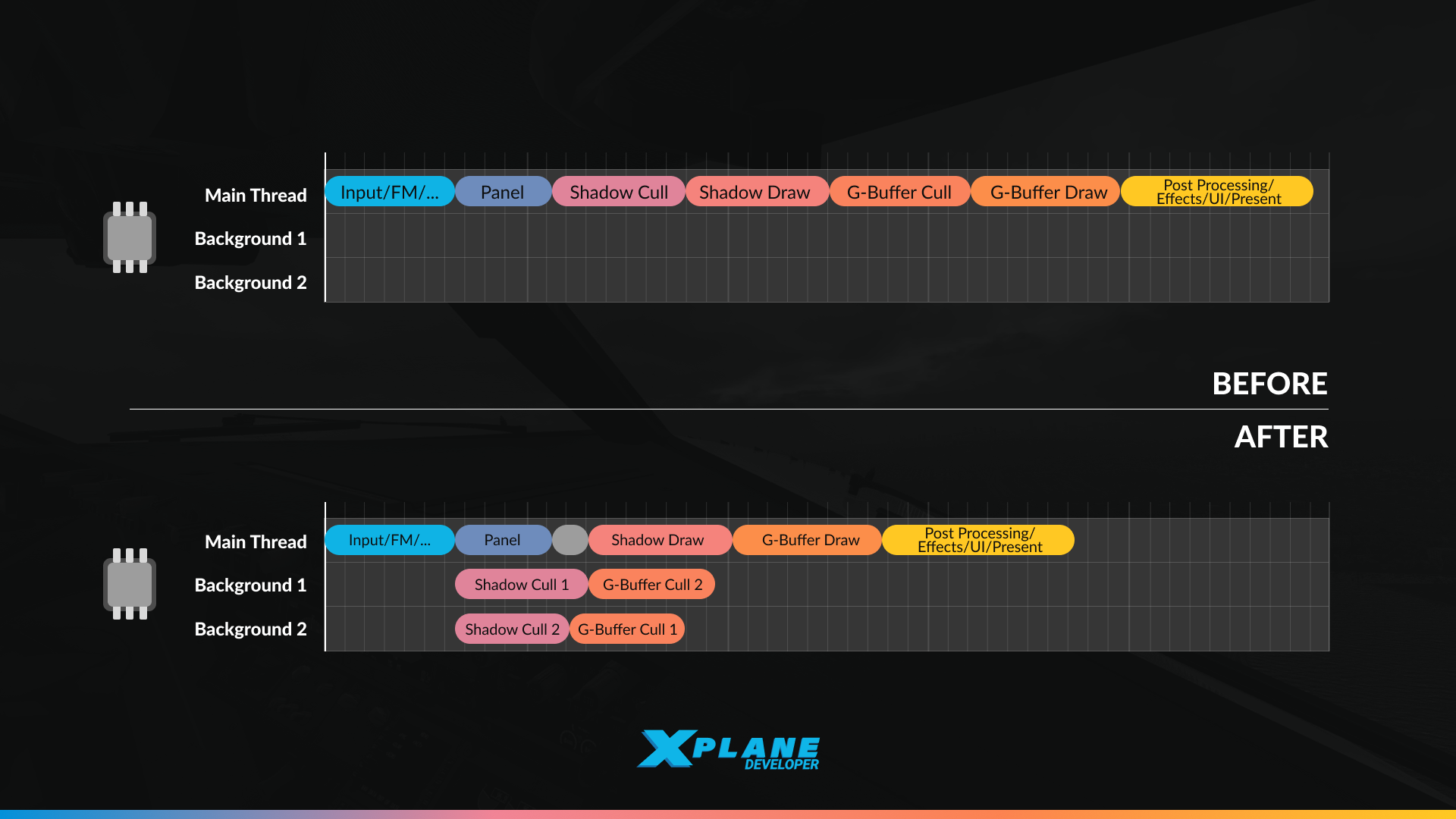
^ This is a very simplified graphic demonstrating the concept of threading in X-Plane. It is neither a statement of the number of cores used nor the number of jobs created per frame.
Because the scenery traversal process takes up such a large amount of the frame time, it makes for an obvious target for multi-core improvements. And that’s exactly what’s in 12.4. As soon as the camera is resolved and we actually know where the virtual eye is and which direction it’s pointing, we kick off the scene traversal process for shadows and the main scene. It’s actually done in multiple steps across multiple CPU cores, so that we can minimize the time it takes from start to finish.
While this goes on in the background, we are now also running the panels and avionic devices. This lets us effectively hide slower avionic updates, since X-Plane can go wide on crunching the scenery at that time. You will especially notice this with add-on aircraft that have very high panel draw times, but even our Garmin and built-in instruments aren’t totally free either.
Additionally, we try to schedule things in an ideal way. So we aim to get the shadow scenery traversal and preparation done first, so as soon as the panels are done we can start actually encoding the commands for the shadow rendering. While this goes on, the much more expensive main frame scenery traversal can finish up in the background and ideally we can immediately hit go on its rendering command generation once that is ready.
Of course this is the theory, in practice things might not finish in time and then the main thread has to wait for results to come in. It should still be faster because the scene traversal itself is done in parallel, so it should be faster than if only the main thread was working on it by itself. But theory and practice don’t always line up. Again, the only way to know what perf you will see is by testing this yourself.
Additionally, we have also improved the drawing hot path and reduced the number of state changes X-Plane has to make in order to from one object to another. We also moved a lot of the just-in-time calculation for material parameters and data to the background thread so that once we are actually drawing things, we can just emit commands as fast as possible.
However, actual drawing of the scene is still single-threaded! Once the parallel scene traversal has concluded, X-Plane’s main thread will still create one command buffer to encode all of the rendering needed. Likewise, multi-monitor set ups could see a much bigger improvement in theory, but in practice we still have to traverse the scenery of each monitor in sequence.
Where we are going
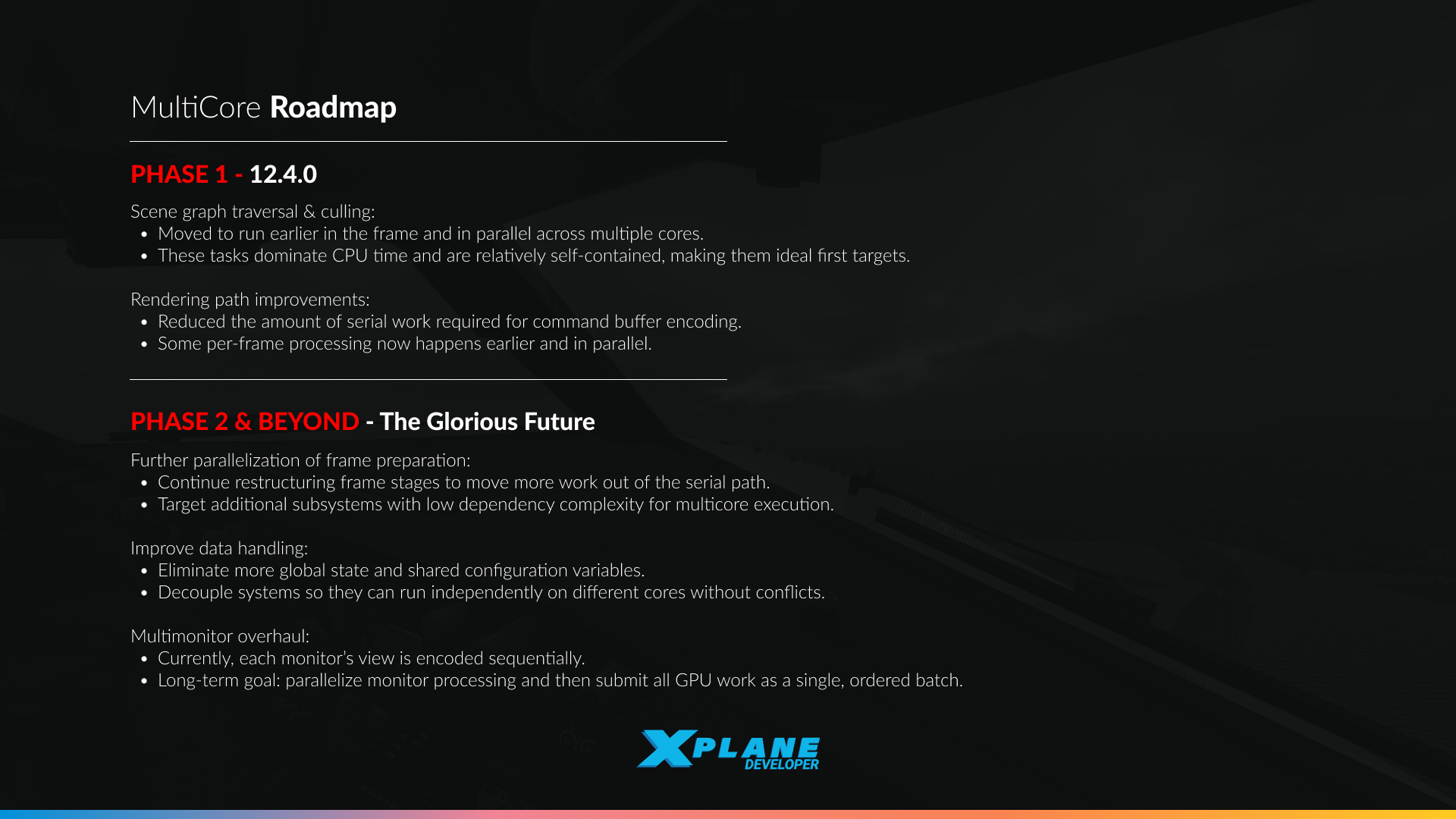
The obvious two are parallel rendering of the frame and doing multiple monitors in parallel. The less obvious one is that we could also do the shadows and main rendering in parallel and then just submit the work to the GPU in the right order. All of these are on the roadmap, but they require more work to the engine itself. There is still a bunch of shared global state when it comes to actually rendering a scene, which we’ll have to clean up first.
One of the things that makes me really excited is the new job system that has actually been shipped in 12.3 and which is the underlying thing that makes the multi core work possible. Instead of carefully writing C++ that dispatches and joins all work in just the right order, we can now describe the frame as individual jobs and their dependencies and the computer can figure out the optimal way to dispatch them. This is analogous to the render graph system that we introduced in 12.06 which allows us to describe the scene rendering as a series of nodes with carefully defined dependencies and then the computer can figure out how to actually bake the commands and build the resources.
This gives us huge flexibility in terms of being able to re-organize the frame, since it’s no longer a massive monolithic chunk. Besides the obvious grand improvement that is parallel rendering, we also expect to be able to leverage this system to further improve performance by scheduling the frame more efficiently. But now that the initial work is the boring present, all of this is becoming the new glorious future.

It’s said lots that ‘if you are GPU bound you probably won’t see any FPS improvements’, but consider this…
I set my graphics so that my CPU and GPU are roughly equal – I can’t reduce my GFX for more FPS because of my CPU time.
So I’m expecting to install 12.4, and see zero FPS increase … until I knock a couple of sliders down which you’ve now made possible.
This could saves trees – I might not need a paper bag in VR any more…
‘Where we are going’
Is VR multi-eye the same as multi-monitor?
Where does VR sit in that slide?
VR uses the combined frustum from both eyes to cull the scene once and then uses instanced rendering to draw every object twice, once per eye. This adds extra cost on the GPU since it has to draw every object twice, but on the CPU it’s basically free and there is no benefit as there would be with multi-monitor.
In that case, will the slated improvements in ‘the glorious future’ have any noticeable impact on current VR setups? Or, are we pretty much at the limit of what can physically be achieved, and therefore better GPUs are the only solution? For example, I’m running a 7800X3D & 4070 Super with a Quest 2 with settings to equalise GPU/CPU as it stands; will further parallelisation improve this noticeably or am I better off just saving up for a 5080/90?
This work on multi-threading support exclusively affects the CPU, it’s all in the C++ side of the code. VR tends to be very GPU bound because there are a ton of pixels to shade. We have some ideas to also improve GPU performance, but that’s post 12.4
I am exited because you proof is possible to choose GPU used (under zink).
So now why not add option in multi-monitor setup to run another monitor as ExternalVisuals internally and render that monitor on different GPU (with seperate gpu settings, only those without increase of scenery loading time)
maybe even in VR?? each eye its different monitor (camera seperated by eyes distance).
with 16core+ processors and 32GB+++ RAM running multiple copies should not be any problem.
ExternalVisuals monitor would have different FPS without synchronization with another monitors. and every monitor will must be connected to own GPU because sending display through another gpu has big penalty.
So you distribute tasks for one full frame to different threads; is it possible to divide rendering one frame e.g. in quadrants also, each being processed by its own threads?
Many times when I feel X-Plane is busy (I’m waiting for it to react), I also see that most CPUs are not busy.
Another thing I noticed is when changing the plane on the same airport: It seems X-Plane is reloading all the scenery, and I always wondered: Why?
This is already done. The graphic shown above is super simplified to give a general idea of how the multi-threading works, but internally the work is split into a lot of small jobs and farmed out across more than just 2 background threads. In general for loading, there comes a point when most jobs have finished and only a few stragglers have to be waited on to complete and thus CPU utilization tends to drop. However, load time and run time are two different beasts entirely.
I assume the future multiple monitor optimization will also help us people who stick two tiny monitors in front of the eyes?
Rendering both left and right eye in parallel sounds like another big potential for VR performance, CPU wise.
Anyway, 12.4.0 decreased CPU times already quite noticeably, thanks a lot! : )
Absolutely brillant work. I use scenery addons that add a lot of work to the CPU, like x-world and autoortho. In 12.3 and earlier I experienced stutters when loading new scenery tiles, which took quite a while. That led to ATIS becoming available quite late in the arrival phase often and also forced disconnects from vatsim.
This seems to be completely gone now (had only two flights to test).
Thank you so much. Have a great Christmas everyone.
You guys are friggin awesome. Keep up the good work
Great post and update. Any plans to address VR performance such as dynamic foveated rendering / quadviews?
We cannot discuss any future plans beyond what is already announced at this time. Please refer to roadmaps for any upcoming changes.
did you mean to VR work as 4monitors setup? something like 2x with 720p(stretched) whole scene and 480p only on focus point, overlay (driven by eye tracker). while vr has 2160p native resolution.
Thank you for this first step into multi core. For the first time since XP 10 CPU and GPU have near to equal FPS on my Mac. And I see a very significant performance increase in areas with heavy scenery (from 12 FPS to 28 FPS). Cool.
However this just makes up for the massive FPS loss I experience since updating to 12.2 (or 12.3?) when using ortho scenery and high resolution mesh. I did read that the devs are aware of the bug. Is there a timeline for when it will be fixed or is 12.4 already meant to be the fix?
I am on a Mac Studio, M2 max, 64 GB
12.4 is already the fix for ortho.
I See. Has anything else in addition to multi core been introduced to help with the issue? I ask because in terms of performance with 12.4. I am back to where I was with 12.1. (which is still much better than 12.3.)
The fix for orthos was an independent fix unrelated to multi-core